

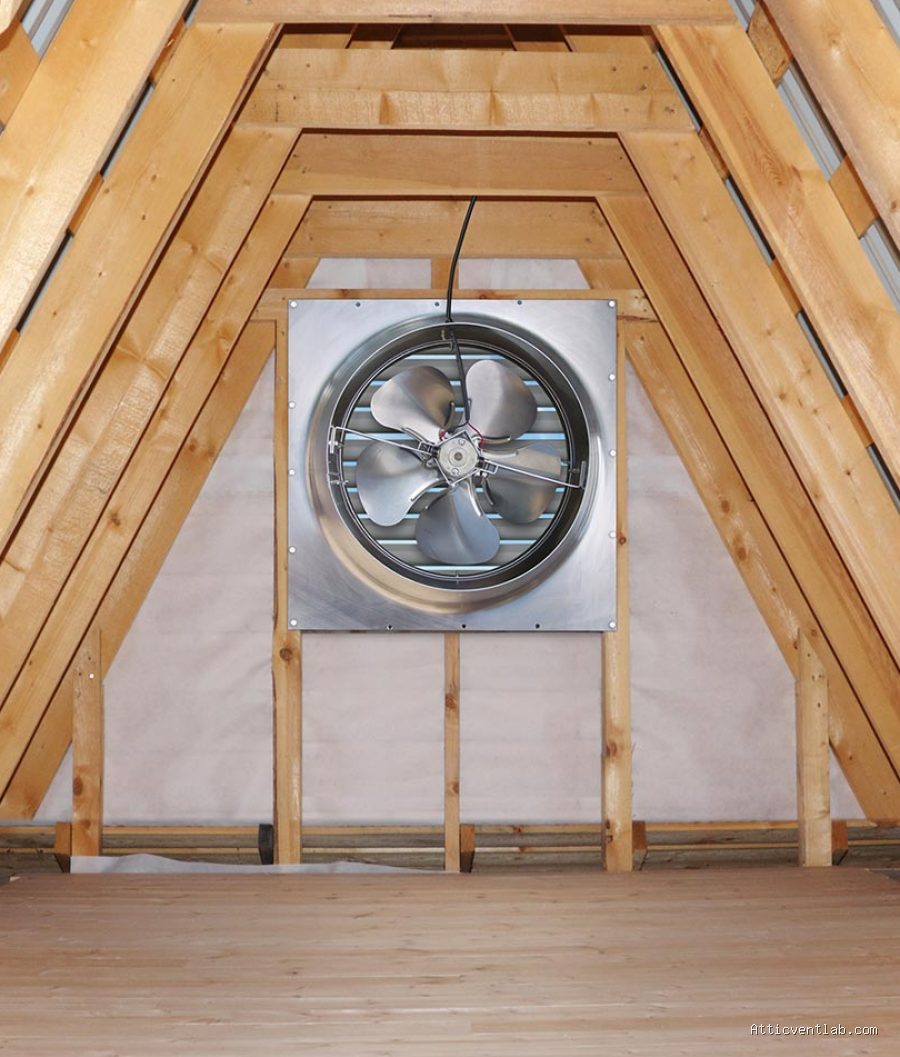
Atticventlab.com – Rattling noises in motorized gable attic fans at high speeds are typically caused by mechanical imbalances, loose mounting hardware, or airflow-induced vibrations that resonate through the fan housing. These sounds often indicate that the fan blades are misaligned, the motor bearings are failing, or the structural connection to the gable wall has weakened over time.
Common Mechanical Culprits
When a gable fan operates at high speeds, even a minor deviation in balance can manifest as a loud, persistent rattling sound. The most frequent mechanical cause is a bent or damaged fan blade. Even a slight bend, often caused by debris impact or improper handling during installation, disrupts the aerodynamic balance of the fan. As the blade spins faster, this imbalance creates centrifugal force that shakes the entire fan assembly against its housing.
Motor bearings are another critical factor. As these bearings age or lose lubrication, they develop play, allowing the motor shaft to move slightly within the housing. At low speeds, this movement might be negligible, but at high speeds, the shaft vibrates, leading to a metallic rattling or grinding noise. If the motor is not securely mounted to the fan bracket, the vibration will amplify, turning a small mechanical wobble into a significant noise issue that can be heard throughout the attic space.
Structural and Installation Issues
Often, the noise is not caused by the fan itself, but by how it interacts with the gable structure. Gable fans are installed in vertical wall openings, which are often framed with wood. If the mounting screws are not tightened firmly, or if the rubber vibration-dampening gaskets have deteriorated, the fan housing will vibrate against the wooden frame. This resonance acts like an amplifier, making a relatively quiet motor seem loud and disruptive.
Another overlooked cause is the backdraft shutter or louvers. High-speed fans move a substantial volume of air. If the external louvers are loose, obstructed, or improperly balanced, the air pressure can cause them to chatter against their frame. This is frequently mistaken for a motor problem, but it is actually an airflow-induced mechanical rattle that occurs specifically when the fan is pushing air at peak velocity.
Troubleshooting and Maintenance Checklist
To determine the exact cause of the rattling, you must systematically inspect both the fan components and the mounting integrity. The following table highlights common symptoms and their likely sources to help you pinpoint the issue quickly.
| Symptom | Likely Cause | Recommended Action |
|---|---|---|
| Rattling only at high speed | Blade imbalance | Inspect blades for bends or debris. |
| Metallic grinding/rattle | Worn motor bearings | Replace motor or lubricate if applicable. |
| Constant vibration/buzzing | Loose mounting hardware | Tighten all bolts and add rubber washers. |
| Clattering sound near vent | Loose external louvers | Secure shutter frame and clear debris. |
Step-by-Step Inspection Procedure
If you suspect a rattling issue, follow these steps to safely diagnose and resolve the problem. Always ensure the power to the fan is completely disconnected at the breaker before performing any physical checks.
- Turn off the power supply to the attic fan and wait for the blades to come to a complete stop.
- Visually inspect the fan blades for any visible dust buildup, debris, or obvious bends; clean the blades thoroughly as uneven weight distribution can cause high-speed wobbling.
- Check the motor shaft by attempting to wiggle it manually; if you feel significant lateral movement, the bearings are likely worn and require replacement.
- Examine the mounting brackets and bolts connecting the fan to the gable wall to ensure they are tight and that no rubber isolators have perished.
- Check the external shutters or louvers for loose connection points or debris that might cause them to flap or rattle when the fan is pulling air.
- Turn the power back on and listen carefully; if the noise persists, consider installing additional vibration-dampening pads between the fan housing and the wall frame.
Risks of Ignoring Attic Fan Noise
Ignoring a persistent rattling sound is rarely a good idea. Beyond the annoyance of the noise, a rattling fan is essentially a fan that is fighting against itself. The constant vibration can lead to metal fatigue, causing mounting brackets to crack or the fan blades to eventually fail and snap off. If a blade detaches at high speed, it can cause severe damage to the internal housing, the attic structure, or the electrical wiring nearby.
Furthermore, an imbalanced fan consumes more electricity than necessary. The motor must work harder to overcome the resistance and vibration, which leads to overheating. Overheating is the primary cause of premature motor burnout. By addressing a rattling sound early, you can often save yourself the cost of a full fan replacement and prevent potential fire hazards associated with strained, overheating electrical components.
Frequently Asked Questions
Q: Can I just tighten the screws to fix the rattling?
A: Sometimes, yes. If the rattling is caused by loose mounting hardware, tightening the bolts and adding rubber washers will solve the problem. However, if the noise is coming from the motor bearings or a bent blade, tightening the frame will not resolve the underlying issue.
Q: Is it dangerous to run a rattling attic fan?
A: It is not recommended. Continued operation can lead to catastrophic failure, such as a blade breaking off or the motor seizing and potentially causing an electrical short. It is best to inspect and repair the unit as soon as the noise becomes noticeable.
Q: How do I know if the noise is the motor or the blades?
A: Spin the blades by hand when the power is off. If the blades feel loose on the shaft or you hear grinding, it is likely the bearings. If the blades spin smoothly but wobble visually, the imbalance is likely in the blades themselves.
📷 Photo by kennedyskylights.com


Leave a Reply