

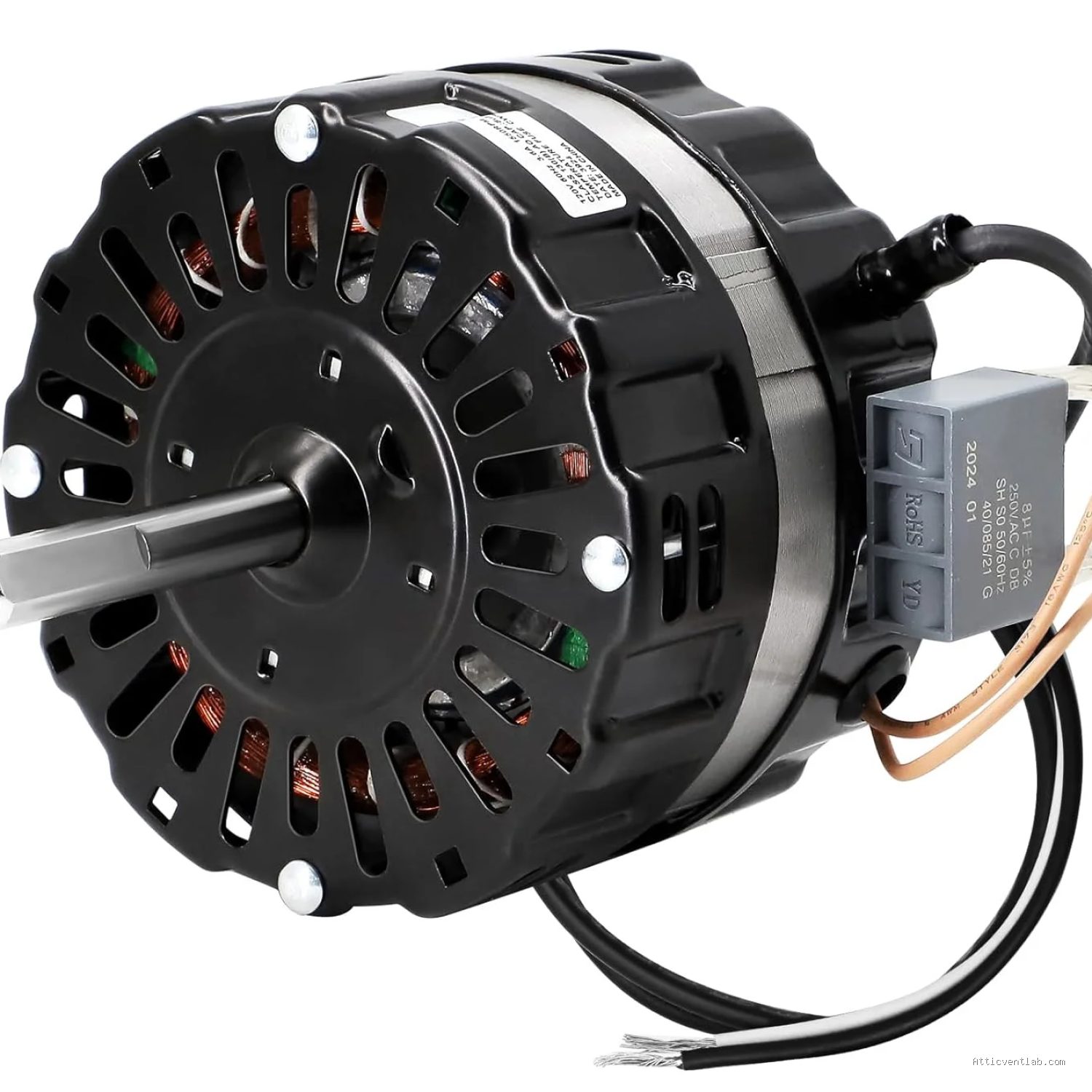
Atticventlab.com – An attic fan motor overheating and tripping the circuit breaker is primarily caused by excessive mechanical resistance, electrical shorts, or inadequate airflow, which forces the motor to draw more current than the circuit can safely handle. When the thermal overload protector fails or is bypassed, the excess heat triggers the breaker to cut power to prevent a potential fire hazard.
Common Causes of Motor Overheating
The attic environment is inherently hostile to electrical components. High temperatures, dust accumulation, and humidity create a perfect storm for fan motor failure. One of the most frequent culprits is debris buildup within the motor housing or on the fan blades. When blades become caked with dust or grime, the motor must exert more torque to spin, leading to increased internal friction and heat.
Another common issue is bearing failure. Over time, the lubricant inside the motor bearings dries out or becomes contaminated. As the bearings degrade, they cause the motor to labor significantly. If the motor is struggling to maintain its rated RPM, it will draw higher amperage, causing the internal windings to heat up rapidly until the circuit breaker inevitably trips.
Electrical issues also play a significant role. If the wiring leading to the attic fan is loose or if the gauge of the wire is insufficient for the motor’s power requirements, voltage drops occur. A motor experiencing a voltage drop often attempts to compensate by drawing more current, which generates excessive heat and forces the breaker to intervene.
Recognizing the Warning Signs
Before a circuit breaker trips, the system usually provides several warning signs. If you notice a burning smell—often described as acrid or similar to melting plastic—coming from the attic, it is a critical indicator that the motor insulation is failing. Another physical sign is the presence of unusual noises, such as grinding, squealing, or humming, which suggest that the mechanical components are stressed.
You should also monitor the physical temperature of the motor housing if you can safely access it when the fan is off. If the motor feels excessively hot to the touch long after it has been running, or if the fan cycles on and off intermittently before the breaker trips, the motor is likely reaching its thermal limit. Ignoring these symptoms will eventually lead to permanent motor burnout or a electrical fire.
Comparison of Attic Fan Performance Issues
| Issue | Primary Symptom | Risk Level | Recommended Action |
|---|---|---|---|
| Dust Accumulation | Reduced airflow, humming | Low | Clean blades and vent |
| Bearing Wear | Grinding or squealing noise | Moderate | Lubricate or replace motor |
| Electrical Short | Immediate breaker trip | High | Inspect wiring by professional |
| Motor Winding Failure | Burning smell, no rotation | Critical | Replace the entire motor |
Steps to Troubleshoot and Resolve Tripping Issues
If your attic fan is consistently tripping the circuit breaker, follow these steps to isolate the problem. Ensure the power is completely disconnected at the main panel before performing any physical inspections.
- Turn off the circuit breaker and verify there is no power reaching the unit using a non-contact voltage tester.
- Inspect the fan blades and motor housing for thick layers of dust, bird nests, or debris that may be obstructing movement.
- Attempt to rotate the fan blades manually by hand. If the blades feel stiff, resistant, or make a grinding sound, the bearings are failing and the motor likely needs replacement.
- Check the wiring connections in the junction box to ensure there are no loose wires or charred insulation.
- If the motor appears clean and rotates freely, use a multimeter to check for a short circuit within the motor windings; if a short is detected, the motor is faulty.
- If the wiring and motor pass inspection, consider checking the circuit breaker itself, as old breakers can become overly sensitive and trip even when the motor is operating within normal parameters.
Practical Prevention and Maintenance Tips
Regular maintenance is the best defense against motor failure. Twice a year, preferably in the spring and fall, inspect the attic fan for any signs of mechanical stress. Cleaning the blades with a soft brush and a vacuum can significantly reduce the load on the motor. If your model has oil ports, ensure you use the specific grade of lubricant recommended by the manufacturer.
Avoid the common mistake of “resetting and forgetting.” If a breaker trips, it is telling you there is an underlying problem. Simply flipping the switch back on without addressing the cause—such as a blocked intake or a failing bearing—will only lead to the breaker tripping again, potentially damaging the electrical panel or the wiring in your walls.
Frequently Asked Questions
Q: Can I just install a higher-amperage circuit breaker to stop the tripping?
A: Absolutely not. Changing to a higher-amperage breaker is dangerous because the existing wiring may not be rated to carry the additional current, which can lead to overheating behind the walls and cause a house fire.
Q: How long should an attic fan motor typically last?
A: A high-quality attic fan motor generally lasts between 7 to 10 years, depending on the climate and how often it runs. Frequent cycling due to improper thermostat settings can shorten this lifespan significantly.
Q: Is it worth repairing the motor or should I replace the whole unit?
A: In most cases, replacing the entire motor or the whole unit is more cost-effective and reliable. Internal motor repairs are complex, and a new unit often comes with better energy efficiency and a warranty.
By understanding the signs of overheating, you can take proactive measures to protect your home. Attic ventilation is essential for roof longevity and energy efficiency, so maintaining a healthy fan motor is a crucial part of responsible home ownership.
📷 Photo by walmart.com


Leave a Reply